
Poker Tournament Management App
Run Poker Tournaments Like a Pro!
From First Hand to Final Table
Seat draws, table balancing, the clock, payouts and league standings: Shuffle Up and Deal! runs the whole night from your iPhone or iPad.


Tournament Directors: Merge Player Profiles Without Losing Payments

Yes, you can merge duplicate player profiles in your tournament app, and doing so pulls registrations, payments and statistics into one canonical record. Most systems, including Shuffle Up and Deal!, treat merges as irreversible once confirmed, and they will often block the action if both profiles have connected logins. Know that before you touch a single record.
TL;DR:
- Most tournament systems treat profile merges as irreversible and block merging if both profiles have active logins, making pre-merge checks crucial.
- Running a flexible, multi-field search before merging reduces the risk of incorrect matches and ensures all relevant payments, registrations, and history transfer properly.
- After merging, verifying that all data and payouts have transferred correctly and documenting the process helps prevent disputes and oversights.
- Using tools like Shuffle Up and Deal! can prevent duplicates by flagging potential matches early and maintaining consistent player histories across events.
- Regular duplicate sweeps before and after major tournaments, combined with good registration habits, minimize the chance of recurring profile fragmentation.
Table of Contents
- Why merge player profiles: benefits and common causes of duplicates
- Pre-merge checklist: what to check before you merge
- How do you actually merge two player profiles?
- Verification, audit trail and what to check afterwards
- When merging is blocked or unsafe: alternatives and safe workarounds
- Data protection and retention: privacy checks when consolidating profiles
- Habits that cut duplicates before they start
- Keep player profiles clean with Shuffle Up and Deal!
- Sources
- FAQ
Why merge player profiles: benefits and common causes of duplicates
Duplicate profiles quietly wreck the numbers that matter to your event. A player with two records might show a fraction of their real buy-ins on the leaderboard, or worse, their prize money gets split across two ghost entries when you’re calculating a payout. Centralised player histories exist precisely to stop this kind of drift, and tools that unify messaging, leaderboards and financial tracking cut the admin hours you’d otherwise spend chasing mismatched totals.
Duplicates creep in for predictable reasons:
-
- A staff member types “J. Smith” one week and “James Smith” the next.
- A parent registers a junior player under a household account, then the player later signs up independently.
- The same person registers from a phone and a front-desk iPad, creating two separate entries.
- Simple typos in surnames or contact details split what should be one profile into two.
Left unresolved, these fragments turn every dispute into a forensic exercise. Merging them back into a single profile is what makes your season-long stats trustworthy.
Pre-merge checklist: what to check before you merge
Rushing a merge is how tournament directors lose data they actually needed. Run through this sequence first.
- Search flexibly, not narrowly. Many platforms require at least three matching fields, such as first name, surname and email, before they’ll surface a genuine duplicate rather than a coincidence. PlayHQ’s duplicate management tool works this way, and it’s a sensible standard to hold yourself to even if your app is more lenient.
- Decide the destination profile. Pick which record survives the merge, usually the one with the longer, cleaner history, and accept that some fields on the losing profile will be overwritten.
- Check for connected logins. If both profiles have an active login, the merge may simply be blocked. Systems that flag login-connected accounts with a distinct marker, as 360Player does, make this check almost instant.
- Confirm what transfers. Payments, registrations and rebuys should move to the surviving profile, not vanish.
- Make sure the action gets logged. You want a record of who merged what, and when.
Pro Tip: Run your duplicate search before the merge screen, not during it. Fuzzy-match tools with adjustable similarity thresholds catch near-identical names that an exact search misses entirely.
How do you actually merge two player profiles?
The mechanics vary slightly by app, but the sequence below covers the shape nearly every tournament platform follows, including Shuffle Up and Deal!'s own profile management tools.
- Open the profile you intend to keep. This is your destination record, the one that will absorb the other’s history.
- Navigate to Duplicate Management or Contacts, then Merge. Most apps group this function separately from standard editing to reduce the chance of an accidental click.
- Run a flexible search for the duplicate. Fuzzy name matching with an adjustable similarity threshold, the model CompuSport uses, lets you catch “Michael” against “Mike” without manually typing every variant.
- Select the matching record as the source. Some platforms let you queue several duplicates at once with a bulk “Merge All” option, though a staged approach with spot checks is safer than trusting a single batch action blindly.
- Review any field conflicts. Where the two profiles disagree on a phone number, email or notes field, choose which value the destination profile keeps.
- Confirm the irreversible prompt. Every credible system stops you here with a clear warning that the source profile will be deleted permanently. Read it. This is the point of no return.
- Complete the merge and check the success banner. PlayHQ’s workflow ends with a confirmation message once the merge finishes, which is your cue to move to reconciliation.
- If the merge button is greyed out, stop. This usually means both profiles carry a connected login, and the platform won’t let you proceed without an alternative route (archiving or asking one player to delete their duplicate account).
- Reconcile payments and registrations immediately. Don’t wait until the next event to spot-check that buy-ins and rebuys landed correctly on the surviving profile.
Merges that pass through a flexible, multi-field search before confirmation carry far less risk of matching the wrong player than a quick name-only lookup, which is exactly why the better platforms make you search properly before they’ll even show you a merge button.
Verification, audit trail and what to check afterwards
A merge that isn’t verified is just a guess with extra steps. Once the confirmation banner appears, work through this short checklist before you close the record.
- Confirm every registration, rebuy and payout tied to the old profile now sits under the surviving one.
- Check the audit log entry names the admin who performed the merge and timestamps it accurately.
- Recalculate leaderboard positions and prize pool totals to make sure the merge didn’t quietly shift a rank or a payout figure.
- Add an event note summarising the merge and why it happened.
That last step matters more than it sounds. When a player disputes their standing three weeks later, a dated note explaining “merged duplicate profile, verified payouts moved correctly” saves you a very awkward conversation.
When merging is blocked or unsafe: alternatives and safe workarounds
A blocked merge isn’t a dead end, it’s a signal to use a different tool. When both profiles have active logins, most platforms simply won’t let the merge proceed, and 360Player’s own guidance points to two workable alternatives instead.
- Archive the duplicate. This keeps the historical data intact while revoking the player’s access through that account, which is the right call when you need the record but not the login.
- Ask the player to delete the unwanted account themselves. Explain clearly which account they should keep and why, since players rarely know they’ve created two profiles until you tell them.
- Reconcile manually where needed. If a payment landed against the account you can’t merge, note it and transfer the figure by hand rather than forcing a merge that the system is actively blocking.
- Avoid exporting full spreadsheets of personal data just to sort duplicates offline. Work within the app wherever possible.
Pro Tip: If you’re staring down a blocked merge fifteen minutes before a tournament starts, archive first and sort the rest after the event. A clean data set can wait a day; a delayed table draw can’t.
Data protection and retention: privacy checks when consolidating profiles
Merging two profiles into one doesn’t excuse you from thinking about what data you’re actually holding onto. Good privacy practice for tournament operators rests on a few consistent habits, and GDPR-aligned guidance for poker software sets out the core ones clearly.
- Collect only the personal details you genuinely need, and delete or anonymise the redundant fields once a merge is complete.
- Honour a player’s erasure request while keeping historical results in aggregated form where that’s legally permitted rather than deleting tournament history outright.
- Maintain audit logs, sign data processing agreements with any vendor touching player records, and never export unprotected spreadsheets of personal information.
- Schedule a periodic data “spring clean” specifically to remove stale personal details that no longer serve a purpose.
Even a flawless merge can leave you holding redundant personal data you no longer need, addresses, scanned ID, old phone numbers, so periodic purging matters just as much as the merge itself.
Habits that cut duplicates before they start
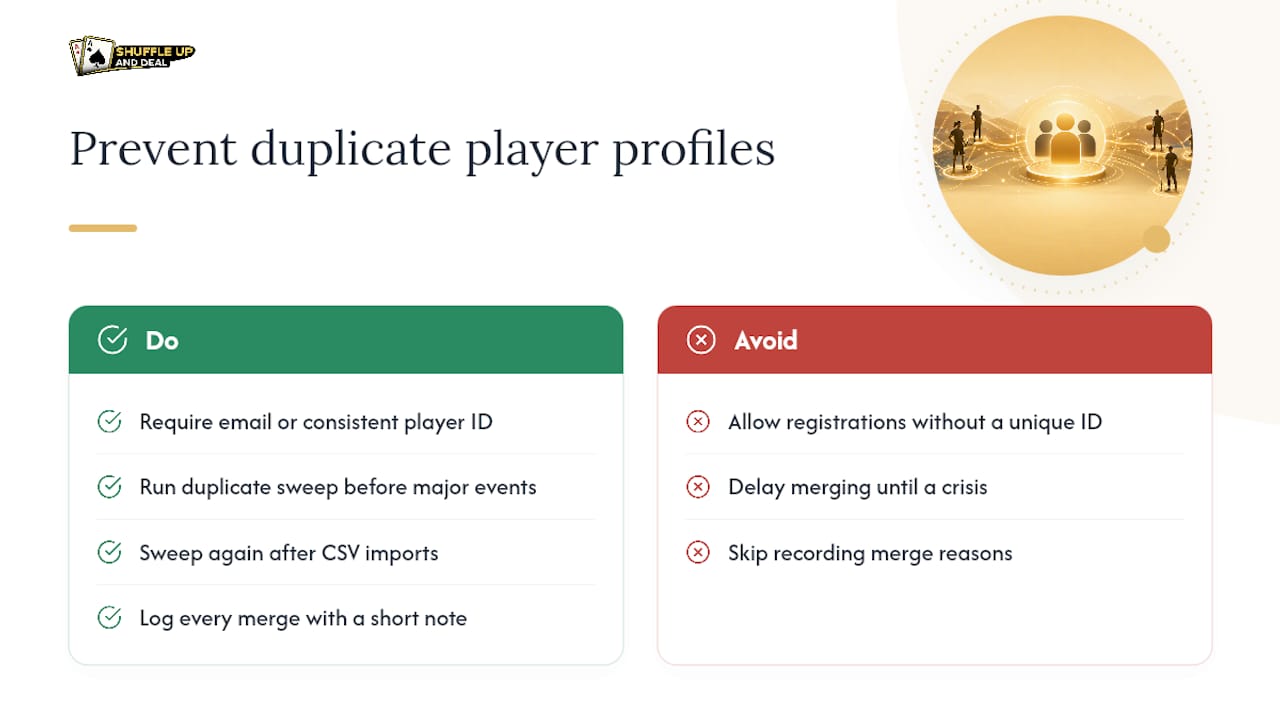
Most duplicate profiles are preventable, not inevitable. Requiring an email address or a consistent player ID at registration closes off the two biggest sources of duplication: inconsistent name formatting and repeat sign-ups from a different device. A quick duplicate sweep before any major event, and again straight after importing a CSV of new players, catches the ones that slip through anyway.
Log every merge with a short note on why it happened. It costs you thirty seconds and saves a genuine headache when a player disputes a missing rebuy weeks later. Treat merging as routine maintenance, not a crisis response, and you’ll spend far less time untangling records at midnight.
- Jason
Keep player profiles clean with Shuffle Up and Deal!
Shuffle Up and Deal! gives you the tools to stop duplicate profiles becoming a recurring headache in the first place. Its player registration and profile controls flag likely matches early, its audit logs record exactly who touched a record and when, and its multi-event management keeps a single player’s history consistent across every tournament you run, not just the one they registered for.

Live updates notify you promptly of registration and payment changes, helping prevent gaps in buy-in tracking or leaderboard standings after a merge. If duplicate handling and clean player records are what you need heading into your next event, the Shuffle Up and Deal! plans start with Home Game and scale up through several tiered subscriptions. Visit the site to see the current pricing and choose the plan that matches how many events you’re running.
Sources
For the exact UI steps behind duplicate handling, PlayHQ’s Participant Profile Duplicate Management guide and 360Player’s duplicate account help article both walk through vendor-specific workflows. For the legal side of consolidating personal data, the GDPR guidance for poker tournament operators covers erasure rights and retention rules in more depth than this article can.
- Participant profile duplicate management - PlayHQ support
- Manage duplicate player accounts - 360Player help
- How to check and clean duplicate players - CompuSport support
FAQ
Can I undo a player profile merge once it’s confirmed?
No. Nearly every tournament platform treats a confirmed merge as permanent, which is why the confirmation screen exists as your last chance to check you’ve picked the right destination profile.
Why won’t the app let me merge two profiles?
The most common reason is that both profiles have a connected login. When that happens, the merge option is typically blocked and you’ll need to archive one record or ask the player to delete their duplicate account instead.
What happens to payments and registrations after a merge?
They transfer to the surviving profile, but you should still check them manually straight after the merge completes to confirm buy-ins, rebuys and payouts landed correctly.
Does Shuffle Up and Deal! support merging or managing duplicate player profiles?
Shuffle Up and Deal! includes player registration and profile management tools designed to flag duplicates early and keep audit logs of changes, reducing how often you need to merge records at all.
How often should I run a duplicate sweep?
A sweep shortly before a major event and again immediately after importing a new list of players catches most duplicates before they affect payouts or leaderboard standings.